Overview
The Corning GE5E596TPNDDU086F is an EDGE8 MTP Trunk distribution non-armored indoor cable featuring 96 multimode OM3 fibers in a plenum-rated jacket. At 86 ft. in length, this standard trunk cable is designed for high-density fiber deployments in data centers and enterprise networks where MTP connectivity is required. The plenum rating ensures compliance with fire safety standards for installation in air-handling spaces.
Features
- 96-fiber capacity for high-density installations
- Multimode OM3 fiber for 10/40/100 Gbps applications
- MTP connector interface for efficient trunk connectivity
- Plenum-rated jacket for air-handling space installations
- Non-armored construction for flexible routing
- Distribution cable design for data center structured cabling
Specifications
| Attribute |
Value |
| Model |
GE5E596TPNDDU086F |
| Brand/Line |
EDGE8 |
| Series |
MTP Trunk |
| Cable Type |
Distribution Non-Armored Indoor |
| Fiber Count |
96 |
| Fiber Mode |
Multimode OM3 |
| Connector Type |
MTP |
| Jacket Rating |
Plenum |
| Length |
86 ft. |
| Configuration |
Standard |
Resources & Downloads



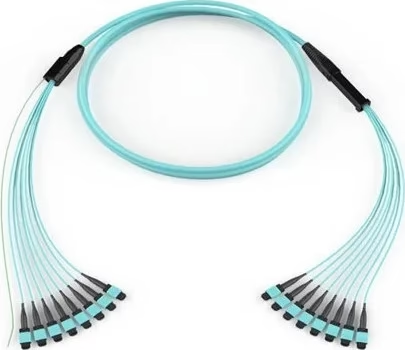
 Corning EDGE8 MTP Trunk 96-Fib...